Wildfly把部分url强制为只能https访问方式,其他url可以http访问
一个网站,把登录、注册部分的代码强制为https访问,其他内容类的使用http或https访问皆可,我们可以这样配置,使用WEB-INF/web.xml文件的security-constraint条目来实现。
原理,wildfly的security-constraint条目:
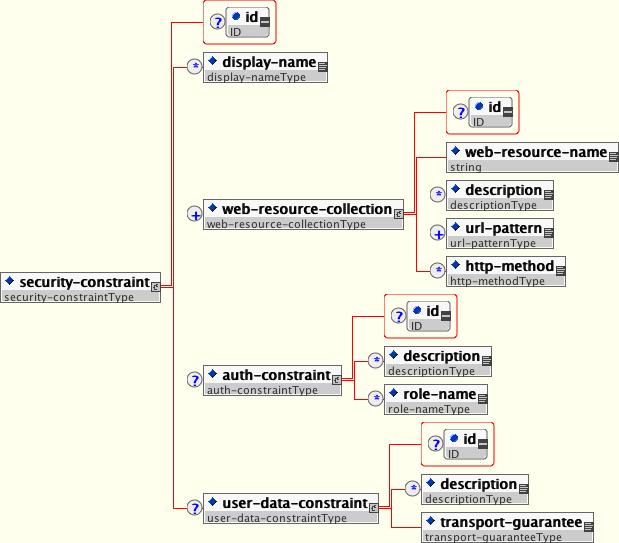
这个security-constraint包含一个或多个web-resource-collection条目,web-resource-collection条目包含一系列可选的url-pattern(比如<url-pattern>/car_public/register</url-pattern>,又比如<url-pattern>/car_public/*</url-pattern>),后面再加一系列可选的http-method(比如<http-method>POST</http-method>)。
auth-constraint这里不多讲,就是使用鉴权角色来控制对这些url的访问。
user-data-constraint条目指定客户端到服务端的传输层安全需求,transport-guarantee包含三种类型的值:NONE、INTEGRAL、CONFIDENTIAL,其中NONE表示不需要传输层安全保护,INTEGRAL表示需要保证客户端和服务器端的传输数据完整性,CONFIDENTIAL表示需要保证客户端和服务器端的数据不被其他人窥探读写,一般来讲INTEGRAL和CONFIDENTIAL就是使用SSL(就是HTTPS)来传输,和WILDFLY_HOME/standalone/configuration/standalone.xml相对应:
<https-listener name=”https” socket-binding=”https” max-post-size=”974247881″ max-header-size=”974247881″ security-realm=”ApplicationRealm” enable-http2=”true”/>
…
<socket-binding name=”https” port=”${jboss.https.port:8443}”/>
…
<security-realm name=”ApplicationRealm”>
<server-identities>
<ssl>
<keystore path=”cloud.car-ocean.com.keystore” relative-to=”jboss.server.config.dir” keystore-password=”car-ocean” alias=”server” key-password=”car-ocean” generate-self-signed-certificate-host=”cloud.car-ocean.com”/>
</ssl>
</server-identities>
<authentication>
<local default-user=”$local” allowed-users=”*” skip-group-loading=”true”/>
<properties path=”application-users.properties” relative-to=”jboss.server.config.dir”/>
</authentication>
<authorization>
<properties path=”application-roles.properties” relative-to=”jboss.server.config.dir”/>
</authorization>
</security-realm>
举例(web.xml例子,这样/car_public/register必须使用https方式来访问,使用http来访问则会返回404):
…
<security-constraint>
<web-resource-collection>
<web-resource-name>WEB_APPLICATION_NAME</web-resource-name>
<url-pattern>/car_public/register</url-pattern>
<url-pattern>/car_public/sms_verify</url-pattern>
</web-resource-collection>
<user-data-constraint>
<transport-guarantee>CONFIDENTIAL</transport-guarantee>
</user-data-constraint>
</security-constraint>
</web-app>
当然,如果所有http都要重定向到https,则更简单:
<socket-binding name=”http” port=”${jboss.https.port:80}”/>
<socket-binding name=”https” port=”${jboss.https.port:8443}”/>
<socket-binding name=”https-ext” port=”${jboss.https.port:443}”/>
把 http://xxx/ 重定向到 https://xxx/ :
<http-listener name=”default” socket-binding=”http” redirect-socket=”https-ext” />
把 http://xxx/ 重定向到 https://xxx:8443/ :
<http-listener name=”default” socket-binding=”http” redirect-socket=”https” />